Get started
From nothing to a gateway
Five steps. Every block below is real output — the project's own rule is that a claim is a measurement or it is removed, and that applies to its documentation too.
-
01Install
Python 3.10–3.13 and git. A GPU — a graphics processing unit — is needed only on the machine that serves; clients need neither.
git clone https://github.com/warith-harchaoui/ai-bunker.git cd ai-bunker python3 -m venv .venv && source .venv/bin/activate pip install -e ".[api]" -
02Find out what you need
Before buying anything. The cheapest answer is often the machine you already own, which is in the catalogue at $0 so that "buy nothing" is a costed option rather than a shrug.
$ ai-bunker recommend --team 2 --model qwen3-coder-next --vision qwen3-vl-8b LOAD MODEL each person decodes 25% of a session, 50% of the team is in session at peak → 95th percentile of Binomial(2, 0.125) = 2 concurrent sequences the machine must sustain 2 sequence(s) above 20 tok/s ✔ BUY Apple MacBook Pro M2 Max 96GB (existing) 90 GiB · 400 GB/s · $0 carries 5 sequences (needs 2) at 20 tok/s each, 27 tok/s alone -
03Configure, and check the claims
cp config/gateway.example.yaml config/gateway.yaml export AI_BUNKER_API_KEY="$(python3 -c 'import secrets; print(secrets.token_urlsafe(32))')" $ ai-bunker doctor [ok ] charter carries operating rules [ok ] 27 rules loaded [ok ] 247 rule assertions pass [ok ] 100% of rules carry evidence [WARN] upstream local answers at http://127.0.0.1:8001/v1 not reachable [ok ] no route leaves this network 12/14 checks passdoctorreports what the deployment actually does, including that a gateway without an API key — an application programming interface key — is open to anyone who can reach it. Open by accident and open on purpose look identical from outside; this is what tells them apart. -
04Serve, and point a client at it
ai-bunker serve                      # localhost:8000

export OPENAI_BASE_URL="http://127.0.0.1:8000/v1"
export OPENAI_API_KEY="$AI_BUNKER_API_KEY"
That is the whole client configuration. Any client that speaks OpenAI now gets the charter, the rule engine and the budget without being configured for them.
The dashboard is at
/gui: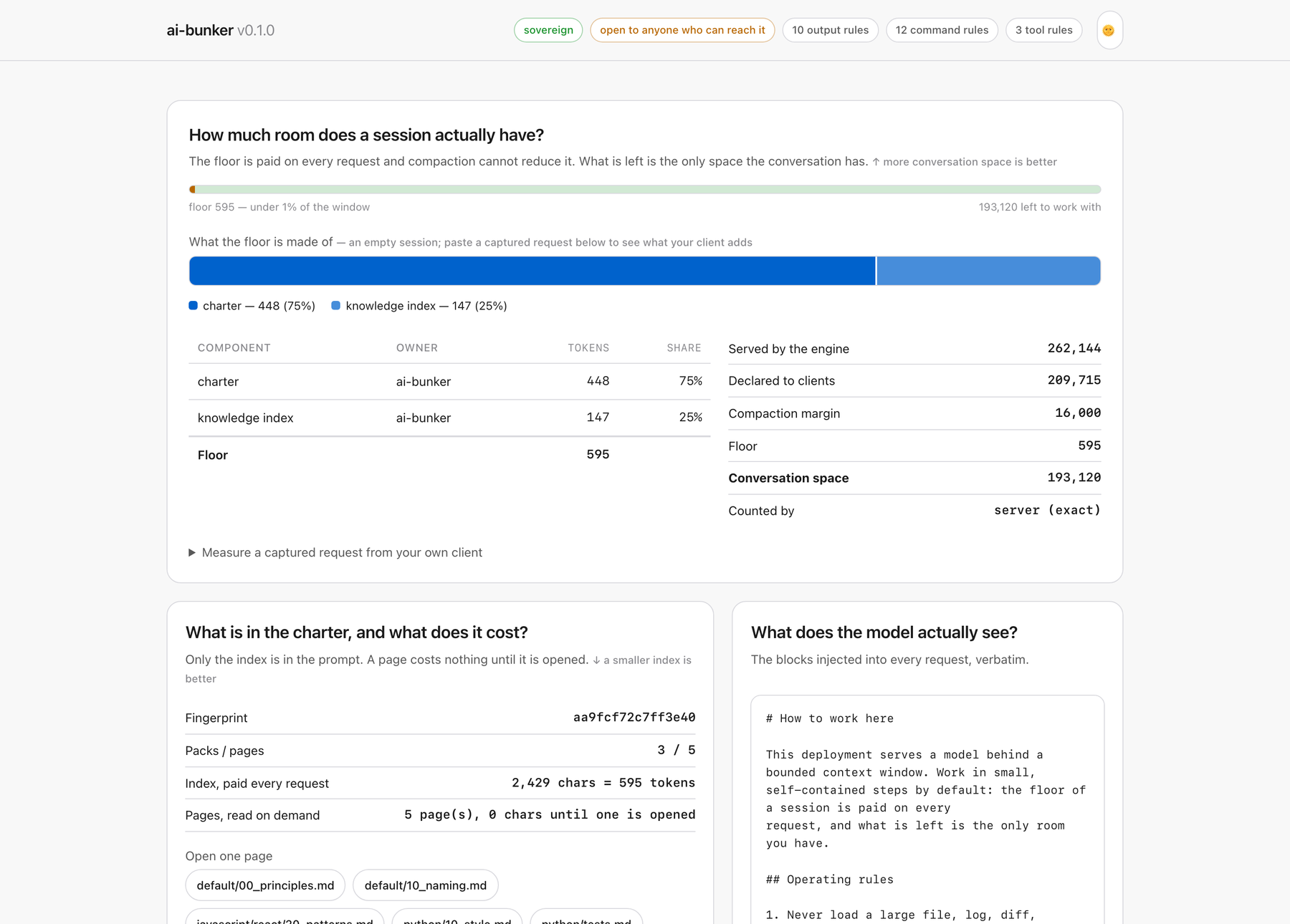
Two bars rather than one: a 300:1 ratio and a composition are two different questions, and one bar cannot carry both. -
05Equip a repository
$ ai-bunker adopt /path/to/project --list
Adopting ai-bunker into /path/to/project:
  + charter/AGENTS.md   (how to work here, injected every request)
  + charter/packs   (the standards pages, read on demand)
  + charter/rules   (the rules, with their own evidence)
  + opencode.json   (points at the gateway)
  + .opencode/plugins/bounded-reads.js   (the one thing the gateway cannot do)
  + .claude/settings.ai-bunker.json   (merge into .claude/settings.json)
  + CLAUDE.md   (what the gateway does to a session)
Nothing is overwritten without
--force. The client kit is deliberately one config and one plugin: everything the gateway can see, the gateway enforces, so a kit carries only what happens before a request exists — bounded reads, no skill injection, compaction thresholds.
Before you depend on it
This is 0.2.0-alpha: a green continuous-integration (CI)
gate, next to projects with years of production use. Command screening applies to
streamed completions as well as atomic ones — a tool call asked for in fragments is
assembled, judged by the same code path, and refused the same way — and
/health reports which guarantees are live
rather than implying all of them are.
And what is still open
- Counting blocks the event loop. The tokenizer probe and the counts themselves are synchronous calls inside asynchronous handlers, so while one runs the gateway serves nobody. It is bounded rather than removed; moving the calls onto a thread pool is the real fix and is not done. A deployment that expects concurrency should know this before it depends on one.
- The audit log grows without bound. Appended to, never rotated: rotation belongs to whatever already rotates logs on that host, and nothing here will tell you the file is large. In-memory state is bounded, oldest sessions evicted first.
-
The shell-tool vocabulary is
a default, not a claim to completeness. A gateway cannot know every
client's tool names, so
SHELL_TOOLSis overridable — and a tool it does not recognise is a command it does not screen.
A limitation nobody published is one somebody discovers. The exact bounds are quoted once, where they can be checked against the code: stated limitations, in full →